Connect Pipedrive to Myuser
Sync meetings, log emails and push deals - pipeline auto-created when missing.
Sync every meeting your prospects book, log outreach emails on the right person, and push new leads into your Pipedrive pipeline - automatically.
What the integration does
- Contacts + organizations: when a lead replies or books, Myuser creates (or finds) the person in Pipedrive and links them to their company.
- Email logging: outreach emails and replies appear as notes on the person's timeline.
- Meetings: booked calls are created as meeting activities (with the Myuser campaign name), and meeting activities created in Pipedrive are picked up by Myuser's booking sync so your campaign analytics show who booked.
- Deals + pipelines: Myuser opens deals in your first pipeline stage - and if the account has no pipeline at all, Myuser creates "Myuser Pipeline" with a "New Leads" stage automatically, so deal pushes never fail on a fresh account.
- Master AI: ask things like "what's in my Pipedrive pipeline?" - the AI reads deals, persons and activities through the same connection.
Total setup time: about 2 minutes.
Step 1 - Find your API token
- Log in to Pipedrive.
- Click your profile avatar (top right) and choose Personal preferences.
- Open the API tab - or go straight to
https://YOUR-COMPANY.pipedrive.com/settings/api. - Copy Your personal API token. If you have never used it, click Generate new token first.
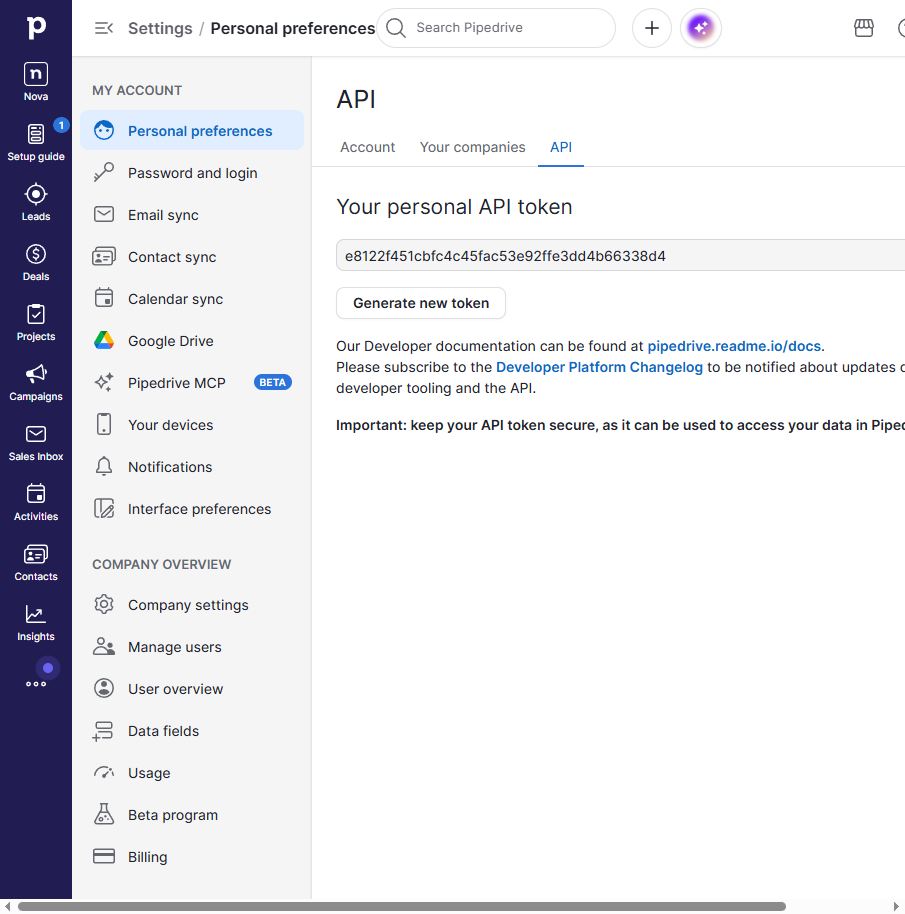
That token carries your own Pipedrive permissions - no app install, no OAuth dance, no scopes screen.
Step 2 - Paste it into Myuser
- In Myuser open Product Settings -> Integrations.
- Scroll to Integrate into your CRM -> Pipedrive.
- Paste the token in the Pipedrive API key field.
- Click Test integration - Myuser verifies the token live, shows the account it belongs to, and saves the key automatically when the test passes.
What to expect
- The connection test creates nothing in your Pipedrive - it only reads your user profile.
- The first booking sweep runs within a couple of hours; after that Myuser checks for new meeting activities on the regular sync cadence.
- Meetings created by Myuser land as meeting type activities with the campaign name in the note, so your reports in Pipedrive stay clean.
Troubleshooting
- "Invalid key" on test: tokens are per-user - make sure you copied the whole string (40 hex characters) with no spaces.
- Regenerated the token in Pipedrive? The old one dies instantly; paste the new one into Myuser and hit Test again.
- Person not appearing right after a push? Pipedrive's search index can lag a few seconds behind creates. Myuser handles this internally (it remembers what it just created), but if you search manually in Pipedrive give it a moment.
- Multiple seats: the token only sees what its user can see. Use an admin's token if you want org-wide visibility.